Documentation
An easy to use small client library for the VoyagerOTA platform, compatible with ESP32 and ESP8266 devices. It allows fetching the latest firmware and downloading OTA binaries from VoyagerOTA or any custom backend.
Requirements
- C++17 or higher
- HTTPClient v3.0.7
- HTTPUpdate v3.0.7
- ArduinoJson v7.0.1
- cpp-semver v0.4.0
- ESP32 or ESP8266
- Wi-Fi connectivity
- Sufficient flash memory for OTA updates
Firmware Upload Rules
All firmware binaries uploaded to Voyager must be built with __ENABLE_DEVELOPMENT_MODE__ false.
Uploading development-enabled builds is strictly prohibited and will be rejected by the platform.
VoyagerOTA library manages firmware releases using channel-based staging and production environments. Understanding this workflow is critical to prevent accidental deployment of development builds to field devices.
__ENABLE_DEVELOPMENT_MODE__ false before uploading.
This ensures the platform treats it as a production build.
__ENABLE_DEVELOPMENT_MODE__ true temporarily.
The library will fetch the latest STAGING release, which contains your production build, allowing safe testing.
ENABLE_DEVELOPMENT_MODE true. This prevents field devices from accidentally receiving development firmware and ensures that all release channels are tracked correctly.
Quick Start
Example usage for fetching releases and updating firmware:
// Development mode is for staging/testing.......
#define __ENABLE_DEVELOPMENT_MODE__ true
#define CURRENT_FIRMWARE_VERSION "1.0.0"

#include <VoyagerOTA.hpp>
using namespace Voyager;

void setup() {
    Serial.begin(9600);
    OTA<> ota(CURRENT_FIRMWARE_VERSION);

    ota.setCredentials("voyager-project-id-here....", "voyager-api-key-here...");
    auto release = ota.fetchLatestRelease();

    if (release && ota.isNewVersion(release->version)) {
        Serial.println("New version available: " + release->version);
        Serial.println("Changelog: " + release->changeLog);
        ota.setDownloadURL(release->downloadURL);
        ota.performUpdate();
    } else {
        Serial.println("No updates available");
    }
}

void loop() {}
Endpoints Design Approach
- Release Info Endpoint - Returns JSON metadata, must include
version. - Download Endpoint - Serves the firmware binary.
Advanced Mode
Advanced Mode allows endpoint-specific parsers and custom backends. Voyager-specific features are disabled.
#define __ENABLE_ADVANCED_MODE__ true
#define CURRENT_FIRMWARE_VERSION "1.0.0"

#include <VoyagerOTA.hpp>
using namespace Voyager;

void setup() {
    Serial.begin(9600);
    std::unique_ptr<GithubJSONParser> parser = std::make_unique<GithubJSONParser>();
    OTA<HTTPResponseData, GithubReleaseModel> ota(std::move(parser), CURRENT_FIRMWARE_VERSION);

    std::vector<Header> releaseHeaders = {
        {"Authorization", "Bearer your-github-token"},
        {"X-GitHub-Api-Version", "2022-11-28"},
        {"Accept", "application/vnd.github+json"},
    };

    ota.setReleaseURL("https://api.github.com/repos/{owner}/{repo}/releases", releaseHeaders);

    auto release = ota.fetchLatestRelease();
    if (release && ota.isNewVersion(release->version)) {
        Serial.println("New version available: " + release->version);
        Serial.println("Release name: " + release->name);

        std::vector<Header>  downloadHeaders = {
            {"Authorization", "Bearer your-github-token..."},
            {"X-GitHub-Api-Version", "2022-11-28"},
            {"Accept", "application/octet-stream"},
        };

        ota.setDownloadURL(release->browserDownloadUrl, downloadHeaders);
        ota.performUpdate();
    }
}

void loop() {}
To integrate VoyagerOTA with GitHub, you'll need a Personal Access Token with repository read permissions.
The GitHub API response includes the tag_name field, which the library uses as the firmware version for comparison.
Ensure your release tags follow semantic versioning (e.g., v1.0.0 or 4.3.0).
Custom Backend and Parser
Custom parsers allow integration with any backend. All models must extend BaseModel.
#define __ENABLE_ADVANCED_MODE__ true
#define CURRENT_FIRMWARE_VERSION "1.0.0"

#include <VoyagerOTA.hpp>

struct CustomPayload : public Voyager::BaseModel {
    String description;
    String downloadUrl;
    int statusCode;
};

class CustomParser : public Voyager::IParser<Voyager::HTTPResponseData, CustomPayload> {
public:
    std::optional<CustomPayload> parse(Voyager::HTTPResponseData responseData, int statusCode) override {
        ArduinoJson::JsonDocument document;
        ArduinoJson::DeserializationError error = ArduinoJson::deserializeJson(document, responseData);

        if (error) {
            Serial.println("JSON parsing failed");
            return std::nullopt;
        }

        if (statusCode != HTTP_CODE_OK) {
            return std::nullopt;
        }

        CustomPayload payload(document["version"],
                              document["description"],
                              document["downloadUrl"],
                              statusCode);

        return payload;
    }
};

void setup() {
    Serial.begin(9600);
    auto parser = std::make_unique<CustomParser>();
    Voyager::OTA<Voyager::HTTPResponseData, CustomPayload> ota(std::move(parser), CURRENT_FIRMWARE_VERSION);

    ota.setReleaseURL("https://api.hack-nasa-backend.com/firmware/latest");
    auto release = ota.fetchLatestRelease();
    if (release && ota.isNewVersion(release->version)) {
        ota.setDownloadURL(release->downloadUrl);
        ota.performUpdate();
    }
}

void loop() {}
Platform Architecture & Release Flow
Every release is treated as a proper artifact. That means it always has a version, goes through checks, and is deployed carefully to the right channel.
Backend Overview
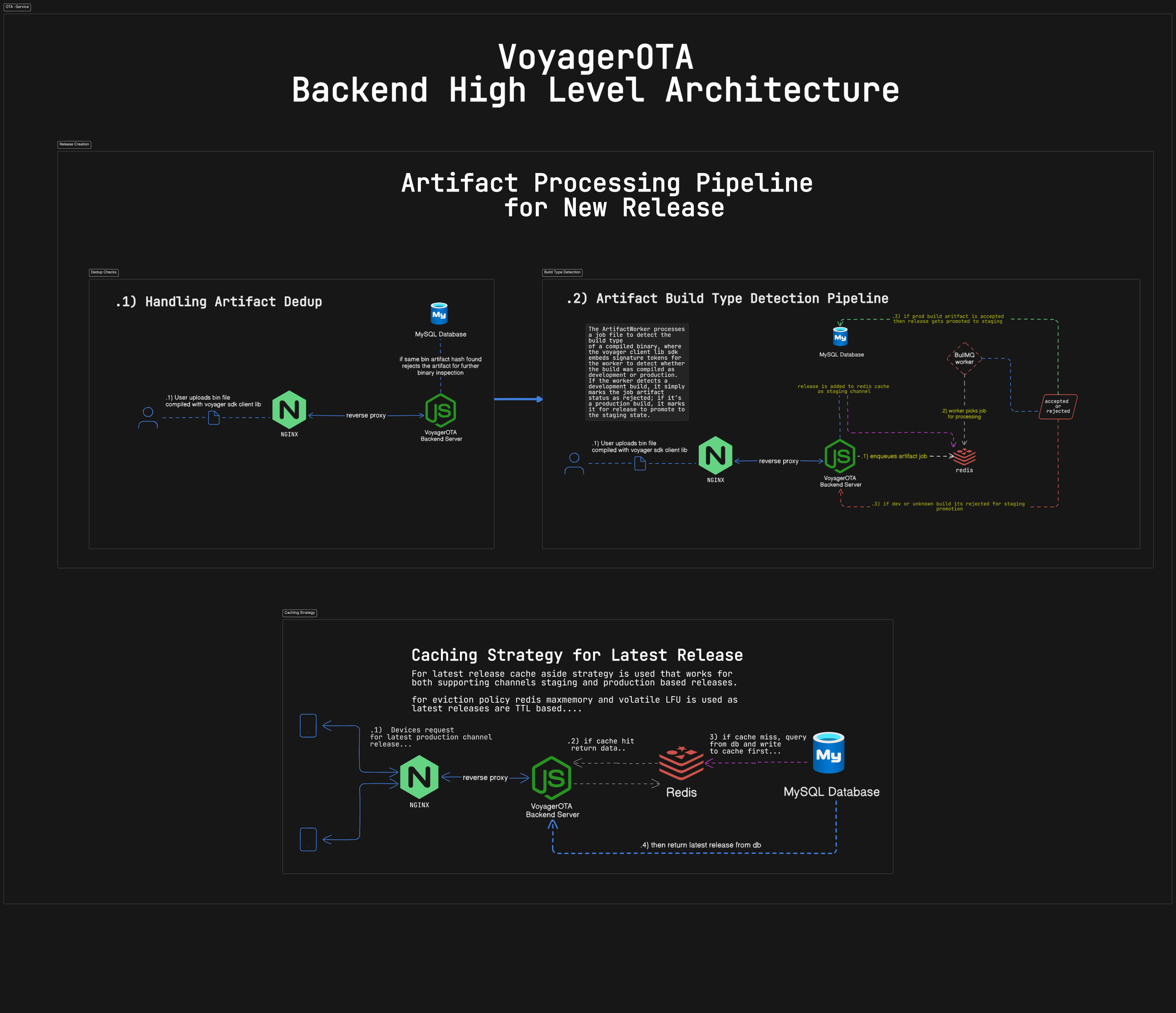
Starting a Release (Draft)
Developers first create a release in a draft state. At this point, we only need some metadata like version number and changelog no binaries yet. This makes planning safe and coordinated.
Uploading Binaries
Once a binary is ready, it’s uploaded to the backend. We immediately check for duplicates using a hash. If it’s already in the system, it’s rejected duplicates never enter validation.
Detecting Build Type
After upload, background workers check the binary type. The backend API itself doesn’t decide promotions only workers do.
Any development or unknown builds are rejected and never go to staging. Only verified production builds move forward.
Release Lifecycle
Releases move through strict states. We don’t just flip flags each transition is validated and must be promoted explicitly.
How Devices Fetch Updates
Devices get releases depending on their build mode:
__ENABLE_DEVELOPMENT_MODE__ true→ STAGING__ENABLE_DEVELOPMENT_MODE__ false→ PRODUCTION
Staging Channel
Verified production builds automatically go to staging. This is a safe space to test before releasing to all devices.
- The cache is updated when a release hits staging.
- Devices get data from Redis whenever possible.
- Least-used releases are evicted automatically.
Promotion to Production
Once a release passes staging, it can be explicitly promoted to production. This is permanent for live devices, though emergency rollbacks are possible.
Rules & Safeguards
- Version numbers always move forward duplicates are rejected.
- Only one non-production release per project is allowed at a time.